Intuit QuickBooksQuickBooks APQuickBooks AR
Microsoft Dynamics Business CentralMicrosoft Dynamics AP
Oracle NetSuiteNetSuite APNetSuite AR
Sage IntacctSage Intacct APSage Intacct AR

Automate Invoice GL Assignments in Seconds
View AI-friendly version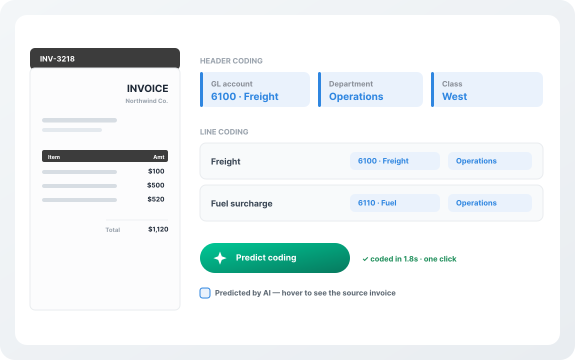
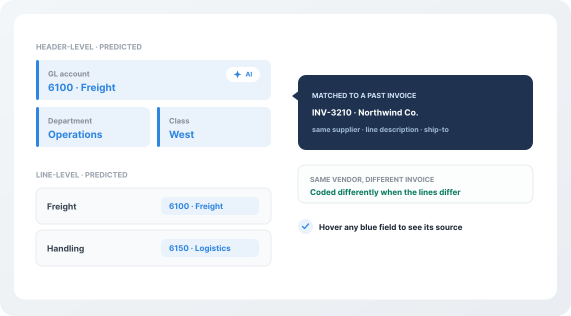
Centime uses machine learning to analyze previously coded invoices and automatically predict the correct GL coding for new invoices with a single click. The AI recognizes invoice structure contextually, matching supplier names, line-item descriptions, ship-to addresses, and account numbers to identify similar past transactions—even when different invoices from the same vendor require different categorizations. Predicted fields are clearly highlighted in blue with hover text showing the source invoice, allowing quick review and confidence in AI suggestions.
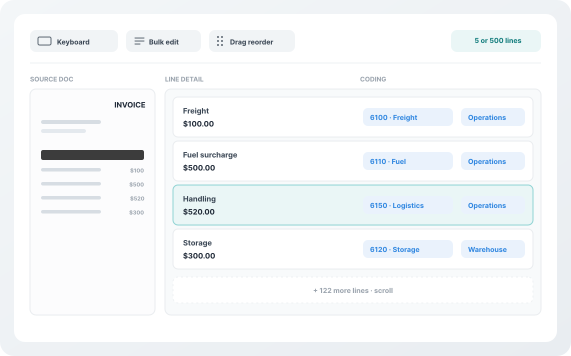
Centime provides a dedicated coding tab designed specifically for AP teams handling complex invoices with multiple lines and dimensions:
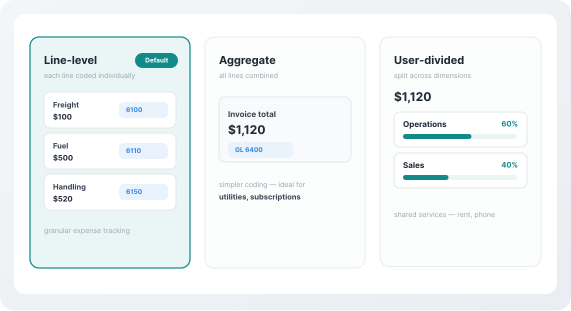
Centime adapts to your business needs with configurable coding modes:
Centime's Rapid Coding doesn't just predict—it learns. Each time you adjust a GL code, change a department assignment, or split an invoice differently, the AI incorporates that feedback into future predictions. The system becomes increasingly accurate at matching vendor-specific patterns, distinguishing between invoice types, and applying your custom dimension logic automatically.
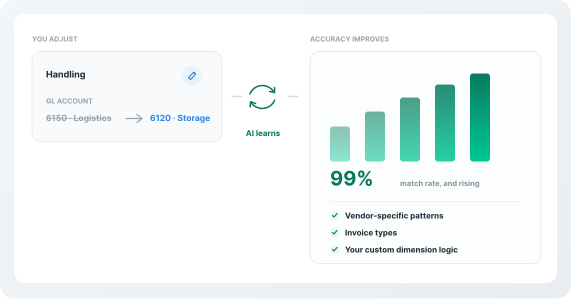
Centime's AI analyzes your invoice history to automatically suggest GL codes, departments, classes, locations, and custom fields—at both header and line levels. The more you use it, the smarter it gets.
Unlike basic tools that only code invoice totals, Centime captures and predicts coding for every line item—including descriptions, quantities, rates, and amounts for complete expense visibility.
The system remembers vendor-specific coding patterns, adapts to different invoice types from the same supplier, and improves accuracy over time as you make adjustments.
Fully embedded in Intuit QuickBooks, Oracle NetSuite, and Sage Intacct with real-time sync—extracted data flows directly to your GL without export/import hassles.
Intuitive keyboard navigation, bulk edits, enhanced dropdowns, dedicated coding tab, and drag-and-drop line reordering—built for teams managing hundreds of invoices with intricate coding needs.
| Features | | Other Invoice Coding Tools |
|---|---|---|
| AI Technology | AI learns from historical invoices without setup | Template-based rules requiring manual configuration |
| Prediction Scope | Header AND line-level coding with all custom dimensions | Header-only or limited fields |
| Learning Capability | Continuously learns from corrections and improves accuracy | Static rules that don't improve |
| Multi-Vendor Intelligence | Adapts coding based on line descriptions and invoice variations | Same coding for all invoices from one vendor |
| Coding Interface | Dedicated coding tab with keyboard navigation and bulk edits | Requires multiple screens and clicks |
| ERP Integration | Fully embedded in NetSuite, Sage Intacct, and QuickBooks with real-time sync | Sync-based; requires export/import |
| Custom Field Support | Predicts all custom dimensions: department, class, location, projects, custom fields | Limited to standard GL accounts |
| Processing Speed | Instant predictions the moment supplier is identified | Manual coding or batch processing queues |
| Line Splitting | User-divided invoices with custom allocations | Manual entry required |
| Transparency | Blue highlights and hover text show prediction source | Predictions not clearly marked |
| Complex Invoices | Drag-and-drop reordering, bulk edits, dynamic table views | Limited line visibility and editing tools |
| Implementation | 7-21 days with dedicated onboarding specialists | 60-90+ days with rule configuration |
Centime Rapid Coding is part of the broader Centime ecosystem—unifying AP, AR, treasury, and banking into one platform. Every invoice you code flows seamlessly into approval workflows, payment processing, cash forecasting, and your ERP. Teams using Centime target Best-in-Class AP metrics: ≈$2.78 per invoice and ~3.1-day cycle time.
Rapid Invoice Coding significantly reduces manual work by predicting header and line-level GL accounts, departments, classes, and custom fields based on similar invoices previously processed in Centime. The AI analyzes invoice data—including line descriptions, ship-to addresses, and account numbers—to find confident matches and apply coding automatically. As you process more invoices, the system gets smarter and more accurate.
Centime predicts all coding fields at both header and line levels, including GL accounts, item codes, departments, classes, locations, projects, and any custom fields you've added to your invoice form. It does not predict free-text fields, dates, or amounts (like invoice numbers or memos). Predicted fields appear with blue highlights and hover text showing the source invoice.
AI-powered coding eliminates human errors by automating repetitive data entry based on historical patterns. Unlike manual coding, which is prone to miskeying and inconsistencies, Centime's AI analyzes past invoices, recognizes supplier-specific patterns, and applies them accurately. The system learns from every adjustment you make, continuously improving accuracy and reducing costly mistakes.
Predicted codes are clearly identified with blue highlights, and the intuitive interface lets you review or adjust as needed. Each manual correction trains the system to predict more accurately on future invoices from that supplier. The more you use it, the better it gets.
Yes. Centime predicts both header and line-level coding and uses line-item descriptions and product codes to differentiate how individual lines should be coded. The system is nuanced enough to learn that different invoices from the same supplier may require different categorizations. The dedicated coding workspace with keyboard navigation, bulk edits, and drag-and-drop reordering makes it easy to handle invoices with hundreds of lines.
Absolutely. Centime supports user-divided invoices where you can allocate invoice amounts across multiple departments, projects, or cost centers. This is perfect for shared expenses like phone bills, rent, or utilities that need to be split according to your business rules.
Centime is fully embedded in Intuit QuickBooks, Oracle NetSuite, and Sage Intacct—not bolted on. Predicted coding syncs to your ERP in real time, maintaining data consistency and eliminating manual export/import processes. All invoice data, including custom dimensions, flows directly to your GL.
To maximize accuracy: (1) Code all fields accurately before posting—this trains the AI for future invoices. (2) Maintain consistent line descriptions from captured invoices. (3) Use custom fields (department, class, location) consistently across your organization. The AI learns from every invoice you process and every adjustment you make.
See how Centime predicts, codes, and syncs every invoice in real time, on the same platform that connects AP, AR, treasury, and banking.