Intuit QuickBooksQuickBooks APQuickBooks AR
Microsoft Dynamics Business CentralMicrosoft Dynamics AP
Oracle NetSuiteNetSuite APNetSuite AR
Sage IntacctSage Intacct APSage Intacct AR

Match Invoices to Purchase Orders in Seconds—Stop Overpayments, Eliminate Manual Work
View AI-friendly version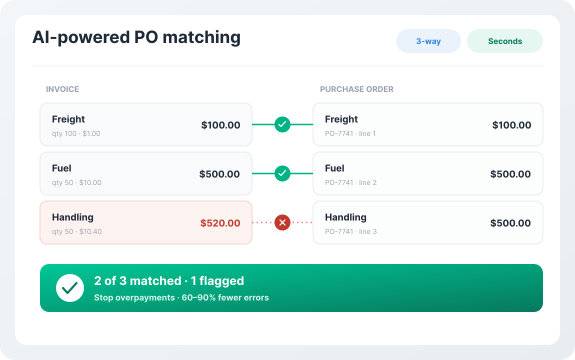
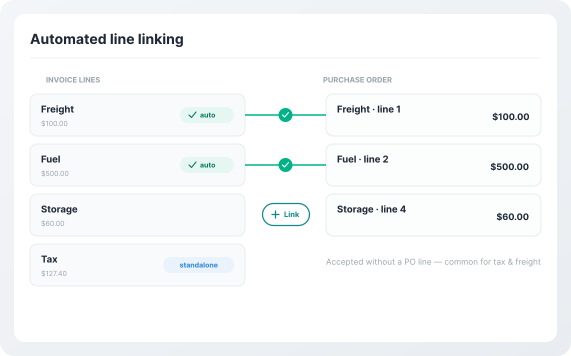
For lines that can't be auto-matched, AP users can quickly link them manually with a simple click, or mark them as accepted standalone lines (common for tax or freight charges).
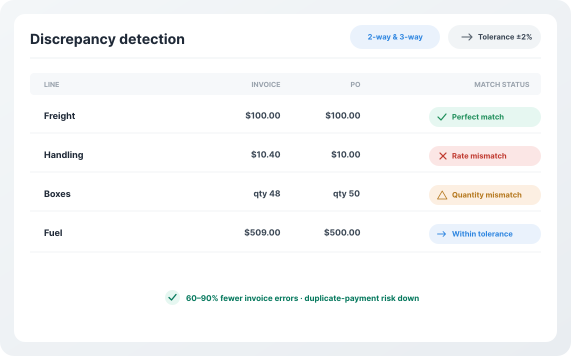
Centime compares invoice data against purchase orders and receipts (when applicable) to identify discrepancies across price, quantity, and amounts. The system flags issues with clear labels. Organizations using automated PO matching reduce invoice errors by 60-90% and significantly lower the risk of duplicate payments.
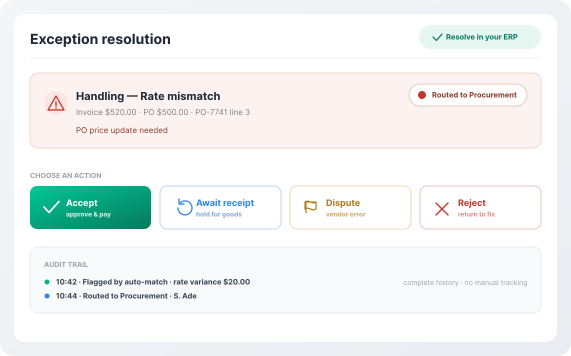
When discrepancies are detected, Centime routes the invoice to the appropriate stakeholder—whether that's procurement for a PO update, receiving for a partial delivery issue, or the vendor for a billing error. Every action is logged with a complete audit trail, giving finance leaders and auditors full visibility without manual tracking. Approvers can resolve issues directly within the ERP—no switching between systems or chasing down information via email.
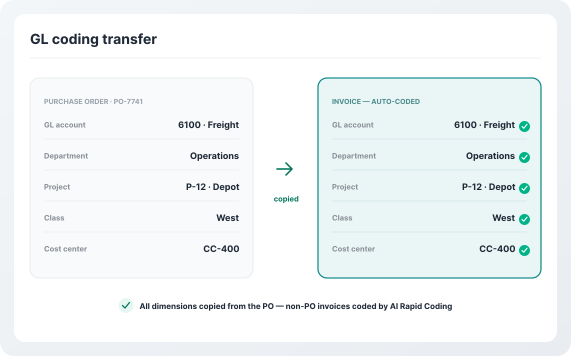
Once invoice lines are linked to PO lines, Centime automatically copies all GL coding from the purchase order to the invoice—including dimensions, departments, projects, classes, and custom fields specific to your business. This eliminates the need to code invoices manually and ensures coding consistency across your organization. If your team uses Centime's AI-Powered Rapid Coding feature, the system can also predict coding for non-PO invoices based on historical patterns, creating a unified, intelligent coding experience across all invoice types.
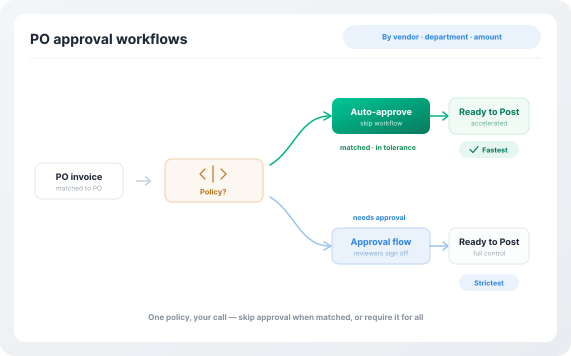
Centime gives finance teams the flexibility to define when PO-matched invoices require approval. Approval policies can be configured by vendor, department, amount, or any combination of criteria to fit your organization's unique needs.
Centime automatically matches invoice lines to PO lines by analyzing rates, quantities, descriptions, and past patterns, making it a best-in-class PO matching software. Your team can focus on exceptions while the system handles the rest. Unmatched lines can be easily linked or marked as standalone with a single click.
Configurable 2-way and 3-way match automation with custom tolerance rules. Centime compares invoices with purchase orders and receipts to detect price, quantity, and amount differences, making it a best-in-class PO matching software. Set tolerance limits to auto-approve invoices within range and flag exceptions. Organizations reduce invoice errors by 60 to 90 percent and minimize duplicate payments.
For companies using PO matching for NetSuite, Centime embeds directly into NetSuite AP workflows. It automatically pulls POs, receipts, and invoices in real time, performs 3-way match automation, routes exceptions through approval workflows, and syncs GL coding instantly. This eliminates manual reconciliation and speeds up the close cycle.
Centime routes discrepancies to the right stakeholder for faster invoice resolution, supporting best-in-class PO matching software. Users can accept, hold, dispute, or reject invoices, with a complete audit trail. This reduces AP fraud and duplicate payments by up to 75 percent.
Once lines are linked, GL coding from the PO automatically populates the invoice, including custom fields, eliminating redundant data entry and reducing coding errors by up to 80%.
| Features | | Other AP Tools |
|---|---|---|
| Line-Level Matching | Intelligent AI that automatically matches across multiple data points and learns over time | Manual or template-based logic requiring configuration |
| ERP Integration | Fully embedded in NetSuite, Sage Intacct, and deeply with QuickBooks with real-time sync | Bolt-on solutions requiring sync or API connections |
| Discrepancy Detection | Precise flagging with clear labels (Rate Mismatch, Quantity Mismatch, etc.) and configurable thresholds | Basic alerts with limited categorization |
| Exception Handling | Built-in collaboration workflows with in-context resolution and audit trails | Email-based resolution or separate workflow tools |
| 2-Way vs 3-Way Matching | Automatically determines match type based on ERP item configuration; supports both 2-way and 3-way | Often limited to one approach or requires manual selection |
| GL Coding | Automatic transfer of all GL coding and custom fields from PO to invoice | Manual entry required for each invoice line |
| Tolerance Configuration | Fully configurable absolute and percentage-based thresholds by rate, quantity, and amount | Rigid rules or limited flexibility |
| Audit Trail | Complete, automatic audit trail of every match, mismatch, and resolution action | Manual tracking or incomplete logging |
| Setup Time | 7-21 days with dedicated onboarding | 60-90+ days with significant configuration |
| Learning Capability | AI continuously learns from historical matches to improve accuracy | Static rules that don't improve |
| Blanket POs & Prepayments | Full support for complex PO workflows including blanket POs and prepayments (NetSuite) | Limited or no support |
| Multi-Entity Support | Seamless support across subsidiaries and entities with proper dimension tracking | Often requires workarounds or separate implementations |
Centime PO Matching is part of the broader Centime ecosystem—unifying AP, AR, treasury, and banking into one intelligent platform. Every invoice you match flows seamlessly into approval workflows, payment processing, cash forecasting, and your ERP, giving finance teams end-to-end visibility and control.
PO matching streamlines various aspects of your business operations. By using this practice, you actively mitigate the risks of incorrect or fraudulent invoices and ensure better cash flow.
In the wake of the pandemic, the Federal Reserve has increased interest rates at the fastest pace in decades, leading to tighter credit conditions for businesses.
PO matching is the process of verifying that invoices, purchase orders, and receipts align before payment is issued. This ensures businesses only pay for goods and services that were actually ordered and received, preventing overpayments, duplicate payments, and fraud. It also maintains compliance with internal controls and contract terms. By automating PO matching, businesses reduce manual errors, speed up approvals, and improve financial accuracy.
Centime automatically links incoming invoices with purchase orders and receipts using intelligent algorithms that analyze rate, quantity, description, and item codes. The system flags any mismatches with clear categorization (rate, quantity, or amount discrepancies) and routes exceptions to the appropriate stakeholders for resolution. This significantly reduces the time required to process each PO invoice while enforcing proper controls and reducing risk.
2-Way Matching compares the invoice to the purchase order to ensure billed amounts match what was ordered. This helps prevent overpayments and incorrect pricing but does not verify if goods or services were received. 3-Way Matching adds a receipt of goods or services as a third checkpoint. The invoice must match both the PO and the receipt, ensuring that what was ordered was actually received before payment is approved. This extra step reduces the risk of paying for missing or incorrect items. Centime automatically determines which type of matching to use based on how items are configured in your ERP.
Yes. Centime immediately flags any discrepancy between invoice lines and corresponding PO or receipt lines with clear labels like Rate Mismatch or Quantity Mismatch. The invoice can then be routed to the responsible stakeholder for resolution through built-in collaboration workflows. Customizable tolerance thresholds allow users to calibrate mismatch flagging based on business needs.
Yes. Centime supports advanced PO workflows including blanket purchase orders and prepayment scenarios. The system handles partial receipts, split orders, and multiple POs linked to a single invoice, enabling flexible procurement processes.
Centime is fully embedded in NetSuite as a SuiteApp, Sage Intacct, and QuickBooks. Invoice data, matched PO information, and GL coding sync to your ERP in real time, maintaining data consistency and eliminating manual processes.
Centime offers granular permissions to control who can resolve different types of mismatches, including rate and amount mismatches, quantity discrepancies, and new invoice lines. These permissions can be assigned to AP users or specialized approvers.
Centime can be implemented in 7-21 days with dedicated onboarding specialists. Because it uses AI-powered matching instead of rigid templates, minimal upfront configuration is required compared to traditional solutions.
See how Centime matches every invoice to its PO and receipt automatically, on the same platform that connects AP, AR, treasury, and banking.